● AI disc golf form analysis · iPhone + Android
Find the fault costing you distance.
Film one throw on your phone. Disc Golf Form Analyzer grades your backhand or forehand against a real coach's ideal form, then hands you the fix and the drill. Spin the throw in 3D to see it for yourself.
A real backhand, rebuilt in 3D by the app
15,000+
disc golfers signed up
17,000+
throws analyzed
20
coach-graded faults
4.3★
52 App Store ratings
01How it works
Three steps. One throw.
01
Film one throw
Any phone, any field. Side-on is best; behind and in front work too. Keep your whole body in frame and the phone steady.
02
Get graded against a coach
The app tracks your body frame by frame and checks it against a coach's ideal backhand or forehand. It only grades what your camera angle can actually show.
03
Fix it with a drill
You get the fault that matters most, why it costs you distance, and the coach's drill to fix it. Then spin the throw in 3D to see it yourself.
02Pose estimation
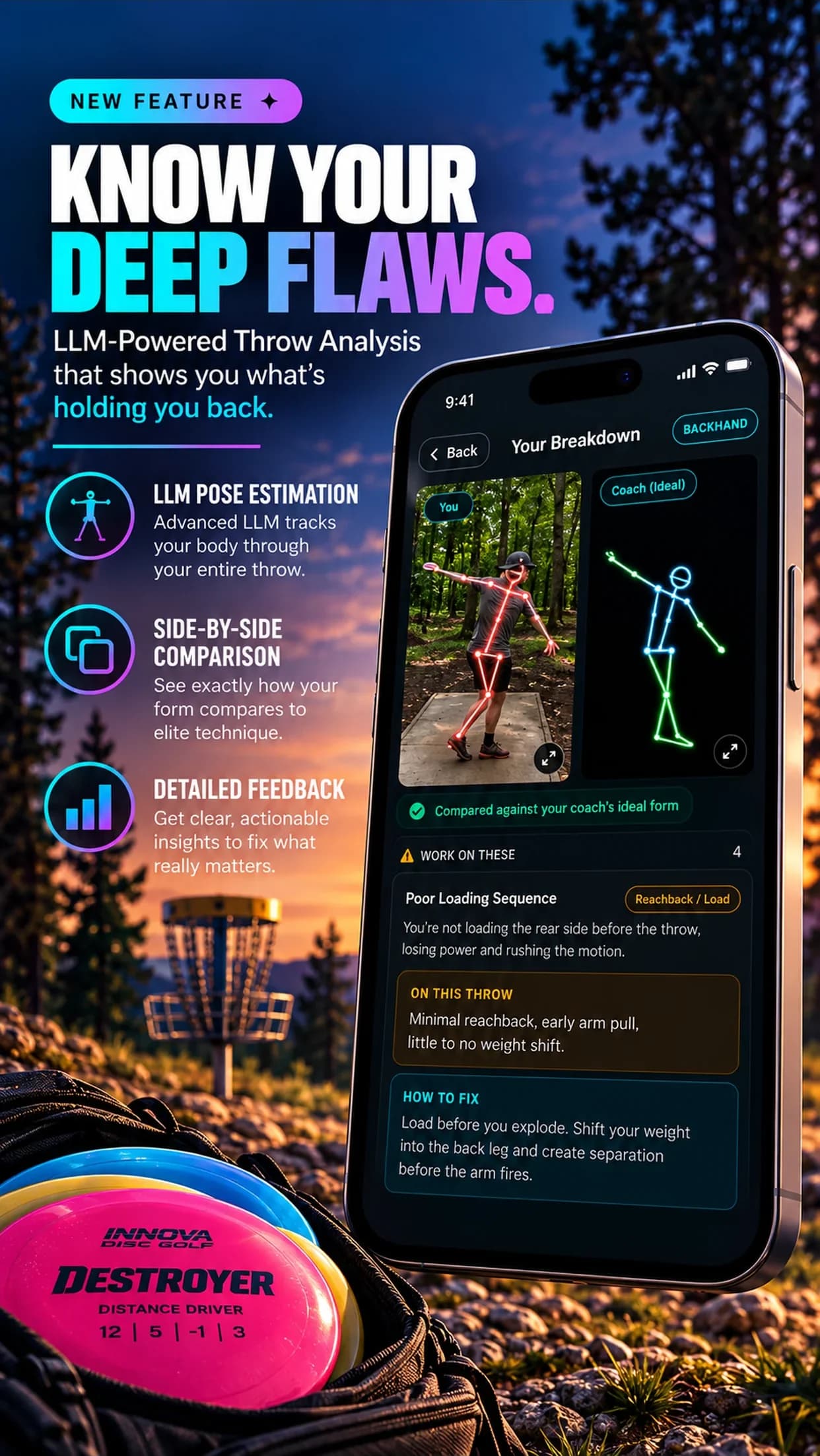
Graded against a real coach.
Most apps compare you to a generic model. Disc Golf Form Analyzer checks your throw against a coach's ideal backhand and forehand, fault by fault, and shows your skeleton next to theirs.
- Backhand and forehand
- 20 coach-defined faults
- Your form next to the ideal
- Never grades what the camera can't see
033D Throw
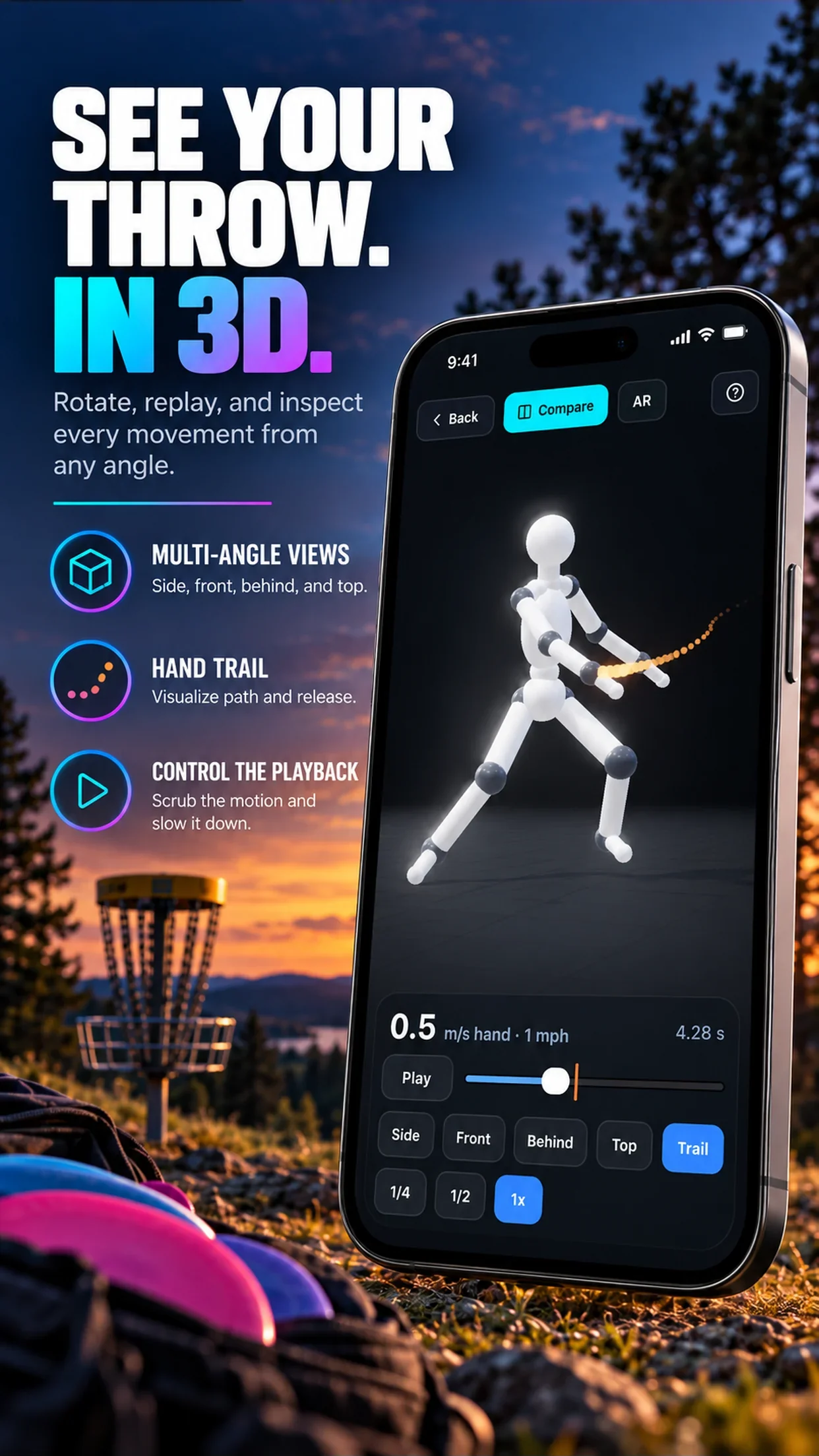
Spin it. Slow it. Compare it.
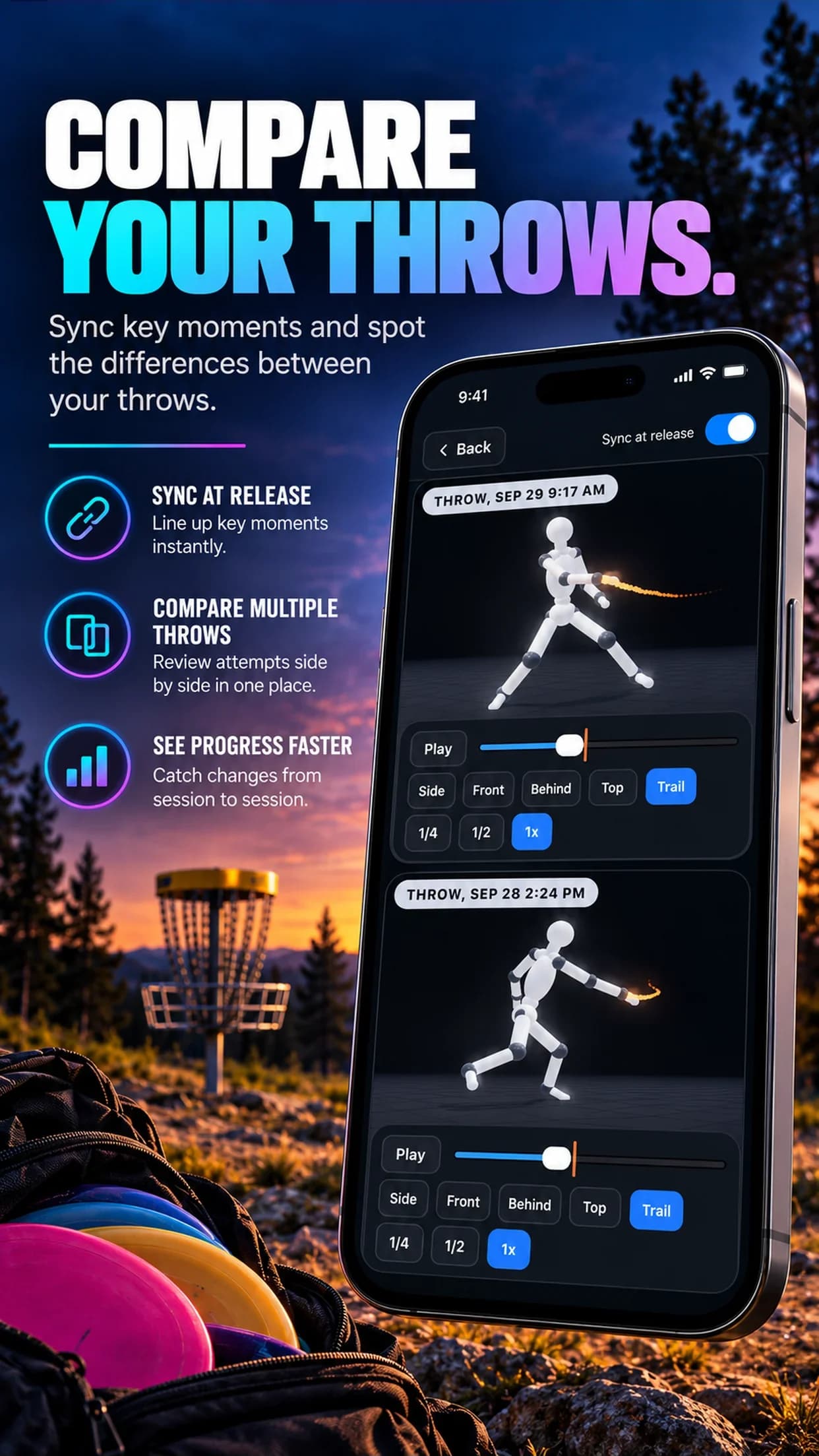
Any throw video becomes a 3D body you can view from the side, front, behind or straight above. Slow the release to quarter speed, put two throws side by side, or place it life-size on the ground in AR.
- Any angle, including top-down
- Quarter-speed slow motion
- Two throws, synced at release
- Life-size AR on iPhone
04AI analysis
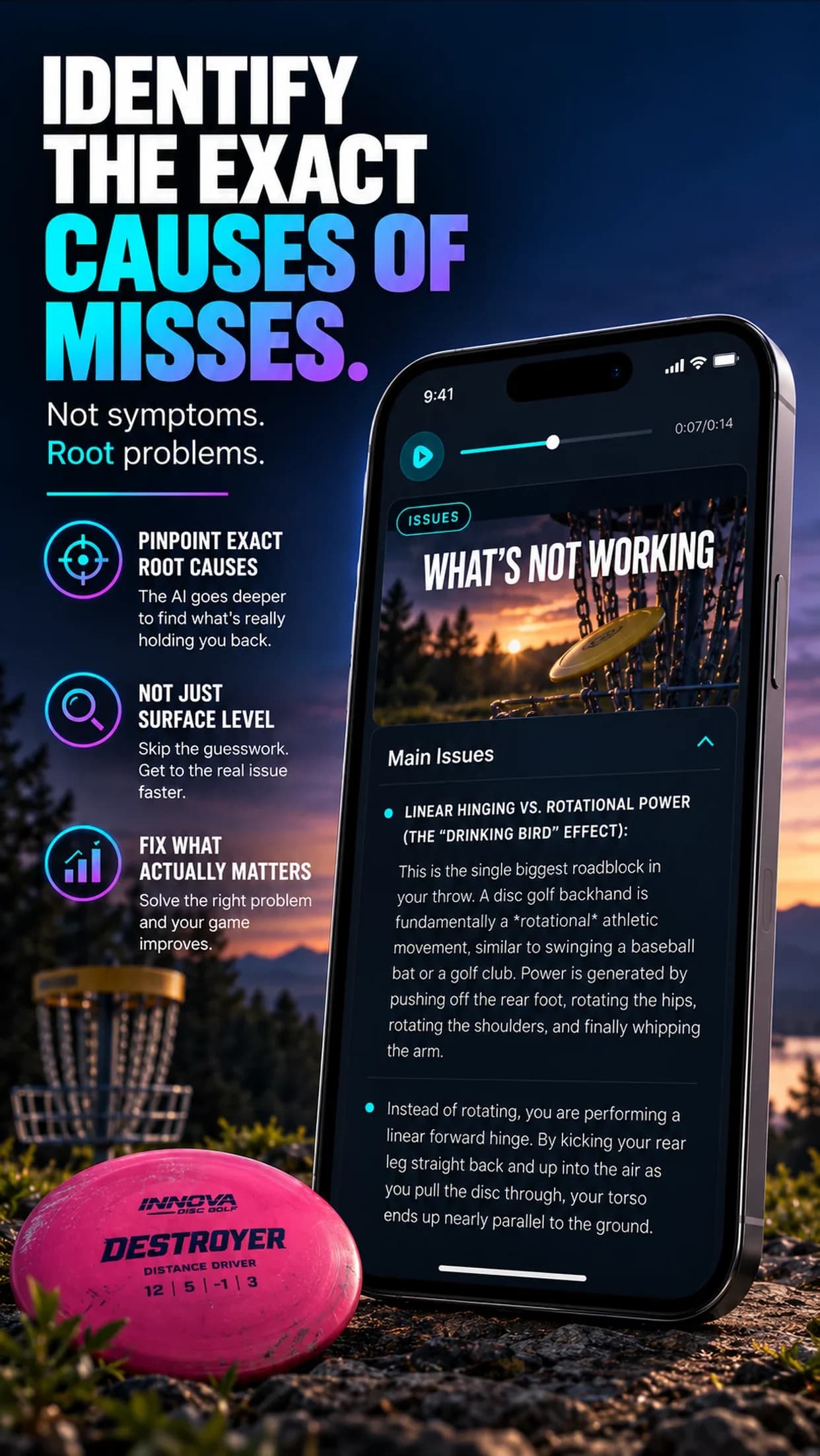
Root causes, not symptoms.
A written breakdown of what's working, the one issue holding you back, why it happens, the fix and a drill. It covers backhand, forehand and putts, and DGFA Coach answers your follow-up questions.
- What's working, so you keep it
- The main issue, explained
- A drill for the fix
- Ask DGFA Coach anything
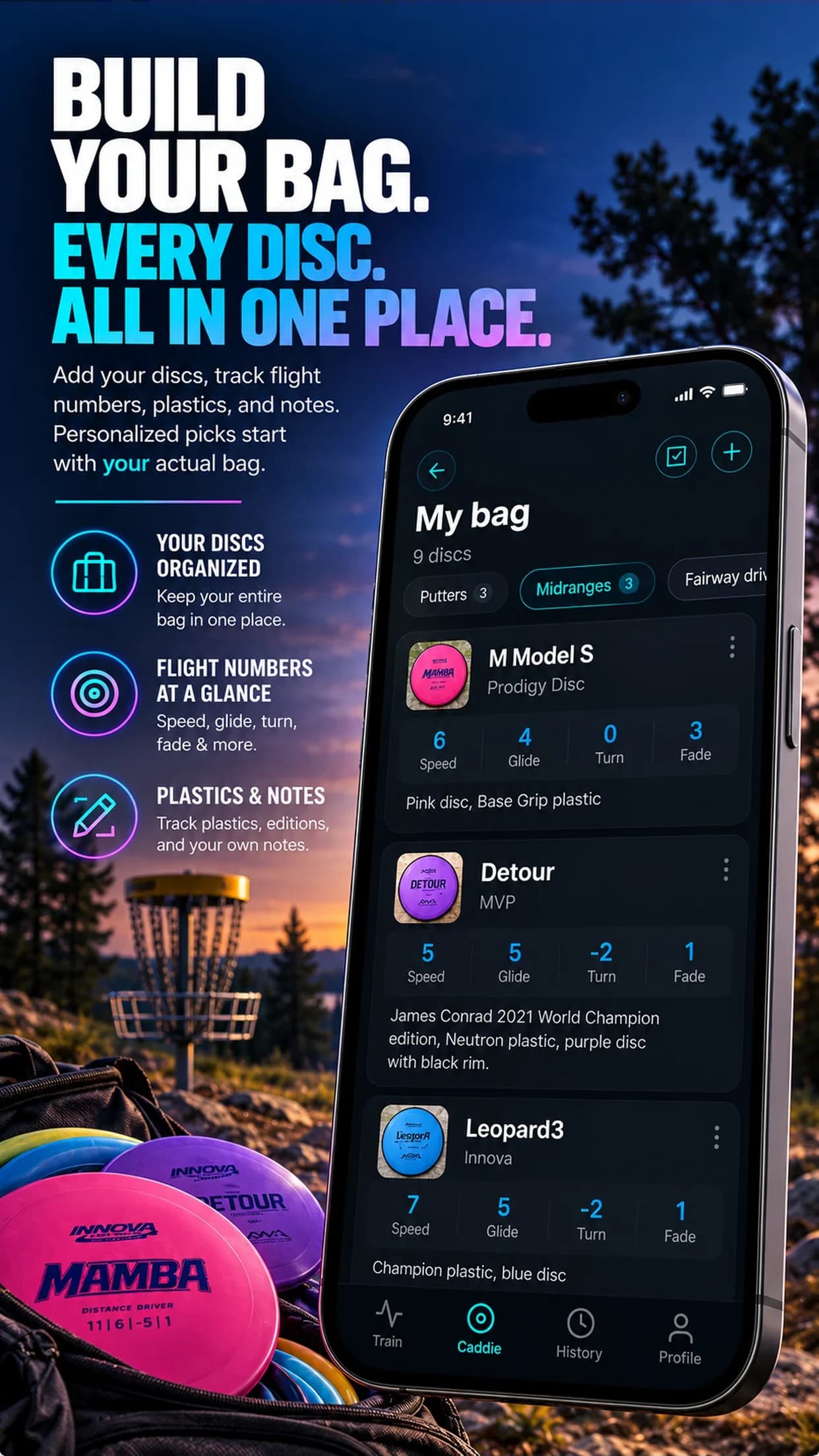
05DGFA Caddie
Your bag, with a caddie.
Snap a photo of a disc to add it with its flight numbers. Snap the hole and get a disc and a shot, picked only from the discs you actually carry.
- Add discs from a photo
- Flight numbers at a glance
- Hole-by-hole disc picks
- Picks from your own bag
06Compare
The honest comparison.
A lesson, a sensor disc and your own camera roll all help. Here is where each one fits.
| Disc Golf Form Analyzer | Private lesson | Sensor disc (e.g. TechDisc) | Filming yourself | |
|---|---|---|---|---|
| Looks at your body mechanics | Only if you know what to look for | |||
| Measures disc speed and spin | ||||
| Graded against an ideal form | A coach's ideal, 20 faults | The coach's eye | ||
| The fix and a drill | ||||
| See the throw in 3D | ||||
| Live, in-person correction | ||||
| Needs extra hardware | Just your phone | No | Sensor disc | Just your phone |
| Cost | $39.99 / year | $80-150 / hour | $299.99 | Free |
07Reviews
From the App Store.
Rated 4.3 out of 5 from 52 ratings. Verbatim reviews, unedited.
Best App for Disc Golf
“This app completely transformed my throw. The improvement was immediate and very noticeable… the yearly subscription is soo economical and better than any real life coaching sessions which cost hundreds.”
Very Helpful
“It’s one thing to tell you how your form is wrong, but to actually tell you how to fix it and provide drills to learn is amazing! Definitely recommend.”
Best Analyzer
“I struggle with lots of issues on my form and the first analysis this app gave me was better than all the feedback I have gotten on social media.”
Solid way to improve form
“This makes form work super accessible and allows you to get instant feedback. Way more productive than trying to figure it out yourself and way cheaper than a coach.”
Definitely worth it
“This app made me realize there was a lot of issues with my form and helped me correct them. This not only made my game better but also added distance and control.”
Helped me a lot
“I really like that this app gives you instant feedback after uploading a video, rather than me having to post it somewhere and hope for feedback days later that may not even be accurate.”
08Pricing
Less than one lesson.
One plan, everything included
$39.99
per year
3-day free trial. Cancel anytime in your App Store or Google Play settings.
- Pose Estimation, backhand and forehand
- Graded against a coach on 20 faults
- AI Analysis with the fix and a drill
- 3D Throw, compare, and AR on iPhone
- DGFA Coach chat and DGFA Caddie
- Drill library
09FAQ
Questions
How does Disc Golf Form Analyzer work?
Film one throw with your phone and upload it. The app tracks your body frame by frame, grades your form against a real coach's ideal backhand or forehand, and tells you the main fault, why it costs you distance, and the drill that fixes it. You can also rebuild the throw as a 3D body and view it from any angle.
Do I need any equipment besides my phone?
No. There is no sensor disc, no wearable and no tripod requirement. Any phone camera works. A steady phone and your whole body in frame give the best results.
Does it work for backhand and forehand?
Yes. Pose Estimation grades both backhand and forehand against a coach's ideal form, using 20 coach-defined faults (10 per throw). AI Analysis also covers putts.
What is 3D Throw?
3D Throw turns a video of your throw into a 3D body you can spin, zoom, slow down to quarter speed and compare side by side with another throw. On iPhone you can also place it life-size in augmented reality.
Which camera angle should I film from?
Side-on is the most informative, but behind and in front also work. The app only grades the faults that the filmed angle can actually show, so you never get feedback the camera could not see.
How much does it cost?
It is $39.99 per year after a 3-day free trial. That is less than a single private lesson. You can cancel anytime from your App Store or Google Play subscription settings.
Is it on iPhone and Android?
Yes. Disc Golf Form Analyzer is live on the App Store and Google Play. Augmented reality in 3D Throw is iPhone-only for now.
How is this different from TechDisc or a launch monitor?
A sensor disc measures what the disc does (speed, spin, angles). Disc Golf Form Analyzer looks at what your body does, which is where the fix usually is: reach-back, hips, weight shift, timing. It also needs no hardware.
Guides
Fix your form, one fault at a time.
Distance10 min
How to Throw Farther in Disc Golf: Fixes by Distance Plateau
How to throw farther in disc golf: why distance comes from sequencing, spin and nose angle, not arm strength, and the fix and drill for each distance plateau.
Read
Backhand8 min
How to Stop Rounding Your Backhand (and Spot It on Video)
How to stop rounding in disc golf: what rounding is, how to spot it on rear-view video, the four usual causes, and a simple drill to fix each one.
Read
Filming8 min
How to Film Your Disc Golf Throw for Form Analysis
How to film disc golf form: which camera angle shows which fault, phone slow-mo settings, distance, framing and light, plus the filming mistakes to avoid.
Read
Free for 3 days
Film one throw. See what changes.
Join 15,000+ disc golfers using Disc Golf Form Analyzer on iPhone and Android.