How it works
How AI Disc Golf Form Analysis Works (and What It Can't Do)
How AI disc golf form analysis turns phone video into faults and fixes: pose estimation, coach grading, 3D, accuracy research and honest limits.
Tushar SainiPublished 8 min read
I build Disc Golf Form Analyzer (DGFA), so this is how our app works, including what it can't do. If you landed here searching for a "disc golf form analyzer review" or a Reddit thread about it, this is the founder's side of the story, written to be checked rather than trusted. The limits section is the most important part.
Short answer
AI disc golf form analysis uses computer vision to find your joints in every frame of a normal phone video and follow them through the throw. It compares those positions and their timing with a reference throw, turns the differences into named faults, and pairs each fault with an explanation and a drill. It is good at spotting position and sequencing problems, less precise than lab motion capture, and it cannot measure disc speed, spin or nose angle.
The pipeline in plain words
Every form analysis app works in roughly the same order, even when the details differ:
- Video in. You film a throw with your phone.
- Keypoints. A pose-estimation model finds body landmarks (shoulders, elbows, wrists, hips, knees, ankles) in each frame.
- Comparison. The software lines your landmarks up against a reference and looks at positions and timing.
- Fault. Differences that match a known pattern get a name, such as rounding or an early hip open.
- Fix. Each fault comes with a cue and a drill.
Steps 2 and 3 are measurement. Steps 4 and 5 are judgement. Most of the honest caveats in this article come from the gap between the two.
Pose estimation, explained without the math
Pose estimation is a computer vision task: given an image of a person, mark where their joints are. Modern models do this fast enough to run on a phone. For example, Google's BlazePose model, the one behind MediaPipe Pose, "produces 33 body keypoints for a single person and runs at over 30 frames per second on a Pixel 2 phone" (Bazarevsky et al. 2020).
Run that on every frame of your throw and you get a moving stick figure: the skeleton overlay you see in form apps. From that stick figure you can read things that matter in disc golf, such as how far your elbow travels away from your chest during the pull, when your hips open relative to your shoulders, and whether your plant leg firms up or collapses.
What the stick figure does not know is depth. A single camera sees a flat image, so anything moving toward or away from the lens is harder to judge. That is the root of most limits below.
How DGFA grades faults: a coach's reference and angle-awareness
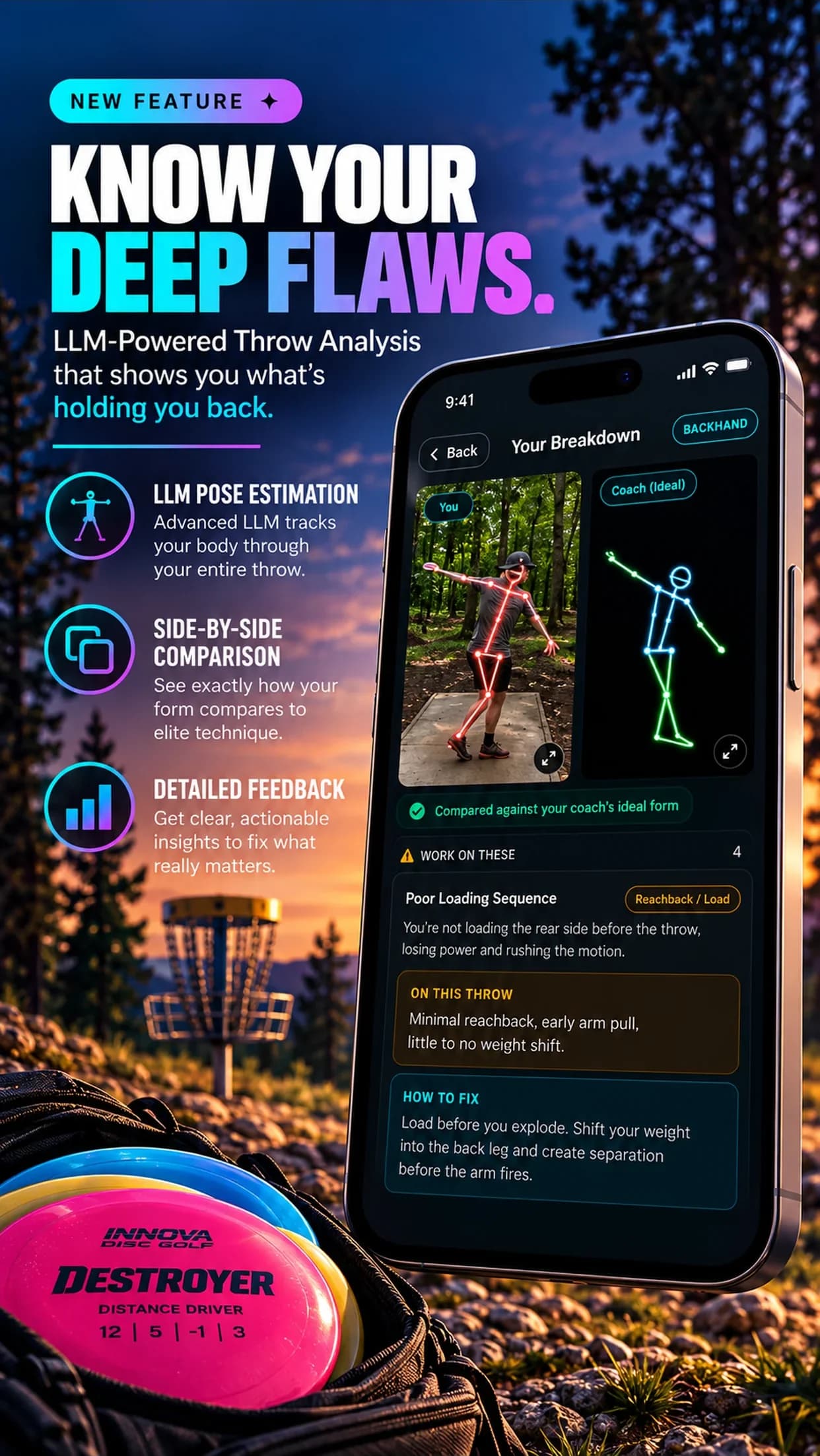
Our Pose Estimation feature follows your landmarks through the throw and compares positions and timing against a real coach's ideal backhand or forehand. It checks 20 coach-defined faults: 10 for backhand and 10 for forehand. You can see the full list on the Pose Estimation page.
Two design choices matter more than the model itself:
- Angle-awareness. Each fault is only graded from camera angles that can actually show it: side, behind or front. Rounding is hard to judge from the side; a collapsing brace leg is hard to judge from behind. Instead of guessing, the app tells you which faults need another angle.
- Three buckets, not one score. Results are sorted into "work on these", "looks good" and "not checked from this angle". The third bucket is deliberate. An app that grades everything from every angle is guessing on some of them.
The fault judgement itself uses a multimodal AI model that is grounded with the coach's reference clip for that fault. Because these models can give slightly different answers to the same input, we run the check several times and take the majority vote, which makes results more consistent from run to run. Each fault then links to the coach's explanation, a cue, a drill and a demo clip.
Why compare against a model throw at all? A meta-analysis of observational learning found that watching a model had a mean effect of 0.77 on movement form, against 0.17 on movement outcome (Ashford, Bennett & Davids 2006). In plain terms, seeing good form helps your form more than it directly helps your results. That fits a tool whose job is shape, not distance.
What the AI Analysis adds (and how it differs from measured faults)
The second feature, AI Analysis, is a different kind of tool. A large language model, prompted specifically for disc golf, reads the throw video and writes a breakdown: what is working, the main issue, its root cause, the fix and a drill. It covers backhand, forehand and putts. DGFA Coach then answers follow-up questions, such as "what if I only have 20 minutes of field work?"
The honest difference: Pose Estimation is anchored to tracked landmarks, a fixed fault list and a coach's reference clip. AI Analysis is a written interpretation. It is better at explaining cause and effect in words and at handling throws outside the fault list, such as putts. It is also more likely to be confidently wrong, because it is not checking against a fixed reference. Use the written breakdown for the "why", and the graded faults plus your own eyes for the "what".
How the 3D Throw is built
A flat video cannot be rotated, so for the 3D Throw feature we use a 3D human body model, Meta's SAM 3D Body. It is a research model released under a license that permits commercial use. It estimates your full 3D body in each frame. We then smooth the motion so it does not jitter and put your feet on the ground so the figure does not float or sink.
The result is a throw you can view from any angle, slow to 1/4 speed through the release, compare with a second throw synced at the release point, or place in augmented reality on iPhone.
The key word is "estimates". The 3D body is inferred from one camera, not measured. Scale is the weakest part: overall body scale carries roughly 6% uncertainty. Angles and timing hold up better than absolute distances, so trust "my hips opened before my shoulders" more than "my reach-back was 31 inches".
What AI form analysis can't do
This is the part most reviews skip, so here it is in full:
| AI form analysis from phone video can | It can't |
|---|---|
| Track joint positions through the throw | Measure arm speed or disc speed |
| Compare timing, like hips vs shoulders | Measure disc spin, nose angle or flight |
| Flag coach-defined faults from the right angle | Grade a fault the camera angle cannot see |
| Rebuild an estimated 3D body | Give exact distances (scale is an estimate) |
| Explain a cause and suggest a drill | Replace a live coach watching many throws |
Specifically, for DGFA:
- One camera means depth and scale are estimates. Roughly 6% uncertainty in overall scale. Angles and timing are more reliable than absolute distances.
- No speed numbers. At 30 fps, the hand is blurred at the fastest moment of the throw, so we do not measure arm or disc speed and do not show speed figures. Research on video analysis notes that accurate measurement needs images that are "sharp and motion blur-free, especially in high speed motions" (Pueo 2016).
- No disc data. Spin, nose angle, launch and flight need a sensor disc such as TechDisc.
- Bad footage, worse results. Body out of frame, a panning camera, dark clips or several people in the shot all hurt tracking.
- It can be wrong. Treat a flagged fault as a second opinion and confirm it on the video before you rebuild your throw around it.
- It is not a coach. It does not see your flight, your fatigue or the 50 throws before this one.
How accurate is pose estimation? What the research says
There are no published accuracy figures for disc golf apps specifically, ours included, so the best guide is general research on markerless pose estimation:
- Single-view 2D models are not lab-grade. Comparing OpenPose, AlphaPose and DeepLabCut with marker-based motion capture, researchers found joint centres were "not yet consistently comparable", with hip and knee differences of about 30-50 mm (Needham et al. 2021).
- More cameras help. OpenCap, which uses two or more smartphones, reached a 4.5 degree mean absolute joint-angle error versus lab motion capture (Uhlrich et al. 2023). A single phone, which is what most of us film with, has less information to work with than that setup.
The practical read: phone pose estimation is good enough to see whether your elbow leads, whether your hips and shoulders separate, and whether your brace holds. It is not good enough to settle an argument over a few centimetres.
How to get a good read from any form app
Most bad results trace back to filming, not the model. The short version:
- Keep your whole body and the disc in frame through the follow-through.
- Hold the phone still. Use a tripod or a bag, never a panning friend.
- Film in good light, with only you in the shot.
- Film from more than one angle so more faults can be graded.
The full checklist, with distances and phone settings, is in how to film your disc golf throw for form analysis.
Then review in moderation. The guidance hypothesis in motor learning says feedback "can have negative effects on motor skill learning if it is provided too frequently or in a form that is too easy to use" (Anderson et al. 2005). Pick one fault, work its drill for a session or two, then film again. For one fault worth starting with, see how to stop rounding your backhand.
How this compares with sensors and coaches
The three options measure different things:
- Phone form analysis (DGFA and similar apps) looks at your body: positions, sequencing, timing.
- A sensor disc (TechDisc) looks at the disc: speed, spin, nose angle, launch.
- A coach looks at everything, adapts in real time and knows you, but costs more and is not always nearby.
They overlap less than you might think, and many players would benefit from more than one. For a side-by-side of stated features and prices, see our comparison page and the longer roundup of disc golf training apps. If your goal is distance specifically, how to throw farther covers which form fixes tend to matter at each plateau.
For context on who is using DGFA: it runs on iPhone and Android, costs $39.99 a year after a 3-day free trial, and is made by Axiom Trinity Labs, LLC. As of October 2026 it has a 4.3 rating from 52 App Store ratings, 15,000+ accounts and 17,000+ throws analyzed. None of that makes a single analysis right. Film it, read it, and check it against the video yourself.
Tushar Saini
Founder, Disc Golf Form Analyzer
Tushar Saini is the founder of Disc Golf Form Analyzer and Axiom Trinity Labs, LLC. He builds the app's form analysis, pose estimation and 3D Throw features, and writes these guides with the app's coaching material.
Questions
Is Disc Golf Form Analyzer accurate?
It is accurate enough to be a useful second opinion, not a lab measurement. It works from one phone camera, so body positions, angles and timing are more reliable than absolute distances, and overall body scale in the 3D view carries roughly 6% uncertainty. Published research shows phone-based pose estimation is not yet as precise as marker-based motion capture. Fault grading can be wrong, especially from a poor camera angle or bad footage, so confirm any flagged fault on the video yourself.
Can AI measure my arm speed or disc speed?
Not from normal phone video, and Disc Golf Form Analyzer does not try. At 30 frames per second the hand is blurred at its fastest moment, so the app shows throw phases instead of speed numbers. A sensor disc such as TechDisc measures speed, spin and nose angle directly.
What camera angle do I need for AI form analysis?
It depends on the fault. Some faults only show from the side, others from behind or in front. Disc Golf Form Analyzer only grades a fault from an angle that can show it and lists the faults that need another angle, so filming from two angles gives the most complete read.
Does AI form analysis replace a disc golf coach?
No. It is useful between lessons or when no coach is nearby, because it names a fault, explains why it happens and gives a drill. A live coach can watch many throws, see the flight, adjust cues in real time and catch things one camera misses.
What happens to the videos I upload?
Uploaded videos are processed to produce the analysis. For the 3D Throw feature, the input copy of the video is deleted after processing.